
The display name for the modules can be changed to suit your preferences. For instance, businesses may prefer to display Sales Pipeline instead of Opportunities. A non-profit might prefer to use Donors instead of Contacts. Many prefer Customers to Contacts. Whatever language is specific to your company, it is easy to configure Legrand Cloud CRM to reflect it.
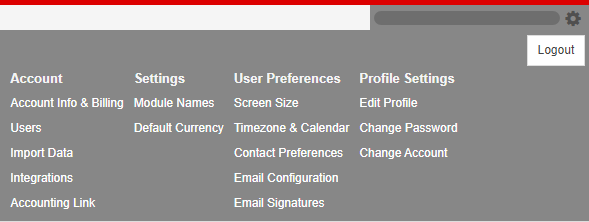
Click the settings icon on the top right of your screen.
Under Settings, click on Module Names.
Select Specify Module Names and enter new module names (singular and plural).
For example, the Companies module can be renamed to Accounts, as such, each company record will be referred to as an Account.
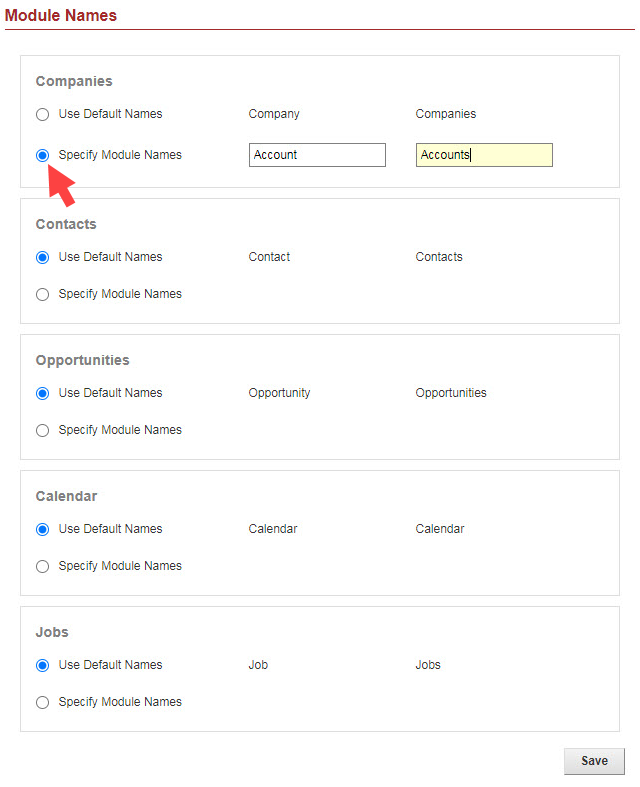
Click Save to apply the changes.